It is 2am on a Saturday in July, it is still 95 degrees outside, and a family's air conditioner just died. There is a baby in the house, and the upstairs is already climbing past 85. The homeowner does what anyone would do: they Google an HVAC company, call the first number, and when nobody answers, they call the second one. Then the third. Whoever picks up first gets a $400 emergency diagnostic, and probably a new customer for life.
That is the entire HVAC phone game in one story. Your best jobs do not come in at 10am on a Tuesday when your dispatcher is sitting at the desk with coffee. They come in at 2am, on Sundays, during the first heat wave of the summer, when your office is dark and your techs are asleep. And in those moments, the phone is not an admin task. It is the business.
I run a company that builds AI receptionists for small businesses, and HVAC was the first trade we got serious about, because the missed-call math is so brutal there. This post is the honest version of what an AI receptionist can and cannot do for an HVAC company, what to look for if you shop for one, and where the limits are. Take my word the way you would take a supplier's advice about buying a supplier's product: useful, but notice my incentives.
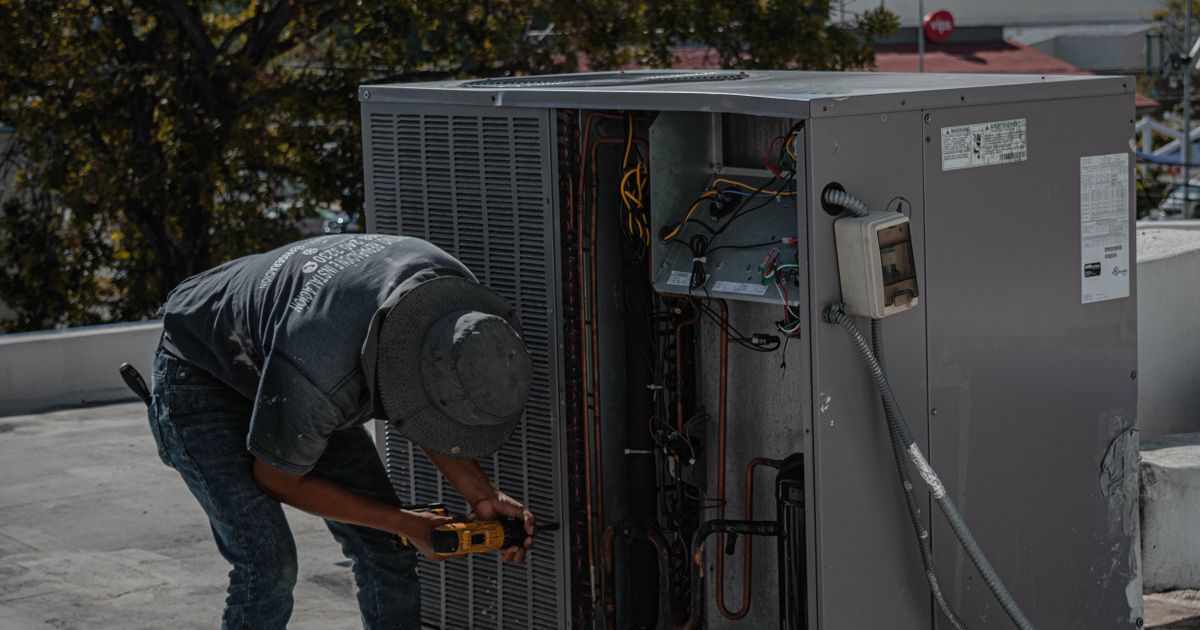
The calls that make or break an HVAC company
Before the checklist, it helps to name what the phone is actually doing for an HVAC company, because it is not the same as a dentist's phone or a restaurant's phone. Your calls split into a few kinds, and they are worth very different amounts of money.
The no-cool emergency. This is the money call in summer. The AC is dead, the house is heating up, and the caller is stressed. They are calling two or three companies at once, and the first one that answers with a real plan wins. These calls spike during heat waves, which is exactly when your office is already slammed and your dispatcher is juggling six things.
The no-heat emergency. Same story in winter, with a sharper edge: a dead furnace can mean frozen pipes and real property damage, not just discomfort. The caller is scared, not just annoyed, and the way the phone is answered matters. A calm, competent voice that books a tech for first thing in the morning is worth more than any ad you will ever run.
The "is this an emergency?" call. The unit is making a noise. It smells funny. It runs but the air is not cold. The caller does not know whether to panic or wait until Monday. This is the call your competitors lose, because a voicemail cannot triage anything. Somebody has to ask three good questions and give the caller a straight answer: this can wait until morning, or no, get a tech out tonight.
Maintenance and tune-up bookings. The quiet money. Spring AC tune-ups, fall furnace checks, filter changes, the customers who call every year like clockwork. These calls are boring and absolutely load-bearing, because a full maintenance schedule in April is what keeps your techs busy in the shoulder season. Every one of these that goes to voicemail is a customer who books with someone else or forgets entirely.
Quotes and second opinions. "How much for a new unit?" "My AC is 14 years old, should I repair or replace?" These callers are shopping, and they are judging you by the first thirty seconds. A phone that answers instantly, asks about the age and brand of the unit, and books a free estimate sounds like a company that has its act together. A phone that rings out sounds like a company that does not.
Property managers and landlords. One caller, many units, repeat business for years. They call with a tenant's address, a unit that is down, and a simple question: can you get someone there today? If your phone handles them well, they stop calling anyone else. If it does not, you lose ten jobs at once, not one.
Notice the pattern. Almost none of these calls need a technician on the phone. Almost all of them need someone friendly, fast, and available at the exact moment the customer's problem is urgent. That is the job. If you want the short version of how this works for HVAC specifically, I put together a page on HVAC service call answering that walks through the whole setup.
What to look for: the HVAC checklist
Here is the list I would hand to an HVAC owner friend. In order of how much each item matters.
1. Emergency triage that follows your written protocol. This is the big one, and it is where most generic AI receptionists fail an HVAC company. A no-cool call at 102 degrees with an infant in the house is not the same as a noisy unit that still cools. A gas smell is not a booking, it is a safety instruction: get out, call the gas company, then call your emergency line. A good AI receptionist runs your triage rules in order, asks the right questions, and books the real emergencies first. Ask the vendor to show you a 2am no-cool call on a demo line, not just a polite booking at noon.
2. It books into your real schedule, by job type, with your real techs. A diagnostic is 60 to 90 minutes. A maintenance visit is about an hour. An install is half a day or more. If the AI books everything as a generic one-hour slot, your dispatcher will spend every morning fixing the board. The AI needs to know your job types and their real durations, read your live calendar, and respect the routes your techs are already on. Ask the vendor to show you a booking that lands on a specific tech's route, not just "an appointment."
3. It knows your service area and says so plainly. HVAC is local in a way most businesses are not. You serve these zip codes, not those. A good AI receptionist checks the caller's area against your map and, when they are outside it, says so kindly and quickly instead of booking a job your techs will have to cancel. The thing to check: can you update the service area yourself when you expand, without filing a support ticket?
4. After-hours coverage you have actually tested, at 2am. A huge share of the value is nights and weekends, so do not accept a demo that only shows business-hours calls. Call the demo line at 11pm on a Saturday and see what happens. The AI should answer in your company name, run the emergency protocol, book the next available emergency slot, and text a confirmation. If the vendor will not let you test after hours, that tells you everything.
5. It answers the pricing questions your office answers fifty times a day. What is the diagnostic fee? Is there a trip charge? What is the after-hours surcharge? Do you finance new installs? This is pure FAQ work and it is perfect for an AI, because the answers never change and the AI never gets tired of repeating them. The check: can you update the answers yourself when your diagnostic fee changes, without waiting on the vendor?
6. It captures the details your techs actually need. Unit brand, approximate age, what is wrong, the address, the gate code, whether someone will be home, whether there is a dog. A tech who rolls up with the right information does a better job and wastes less time, and the customer feels looked after before anyone has even arrived. Ask what fields the AI captures and where they land: on the booking, in the text to the dispatcher, or lost in a transcript nobody reads.
7. Text-back and follow-up are built in, not bolted on. When a call does go unanswered, or a customer hangs up mid-call, the system should text them back within a minute: "Sorry we missed you, here is how to reach us, or reply to book." And every booking should get a confirmation text with the time window and what to expect. Ask whether missed-call text-back is included in the plan or sold as an add-on, because for HVAC it is half the value.
8. A clean handoff rule for the stuff it should not touch. There are calls an AI should never try to handle: a gas smell, a carbon monoxide alarm going off, water pouring through a ceiling, a genuinely furious customer. A good system has a clear escalation rule, usually "take a detailed message and alert the on-call tech immediately," and it follows it without improvising. Ask the vendor exactly what their handoff triggers are, and what happens if the AI is unsure. "I will have someone call you right back" is the right answer to uncertainty.
AI receptionist vs your other options
You already have ways to handle the phone. Here is the honest comparison.
| AI receptionist | Answering service | Another dispatcher hire | |
|---|---|---|---|
| Answers after hours | Yes, 24/7 | Yes, usually | No |
| Triages emergencies by your protocol | Yes | Reads a script, if you write one | Yes, after training |
| Books into your live schedule by job type | Yes | Takes a message, you book later | Yes |
| Captures unit details for the tech | Yes, to your template | Basic name and number | Yes |
| Answers diagnostic fee and surcharge questions | Yes, from your FAQ | Only if you write the script | Yes |
| Texts back a missed call in a minute | Yes, automatic | No | Only if someone remembers |
| Handles two callers at once | Yes, unlimited | Yes | No, one at a time |
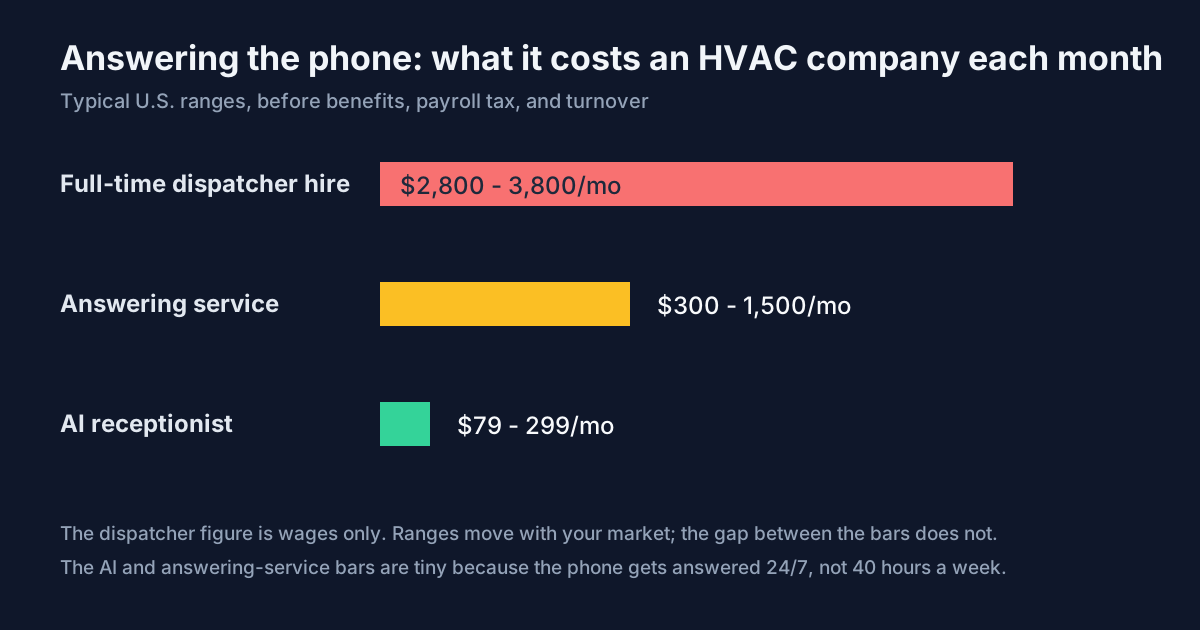
| Typical monthly cost | $79-299 | $300-1,500 | $2,800-3,800 in wages |
| Sounds like your company | Yes, trained on your scripts | Generic | Yes, eventually |
The row most HVAC owners underestimate is the second one. An answering service that takes a message at 2am means your dispatcher spends the first hour of every morning playing phone tag, and the customer who called last night has already booked with the company that answered. Triage plus booking in the moment, at 2am, is the feature that pays for everything else.
What a good emergency call sounds like
Abstract features are hard to judge, so here is what a Saturday 2am call should sound like. Caller: "Hi, our AC just died and it is so hot in here, we have a baby."
A good AI receptionist: "I am so sorry, that sounds miserable, especially with a little one in the house. Let me help you right away. Is the unit completely off, or is it running but not cooling?" Caller says it is completely off. "Okay. We have an emergency tech on call tonight, and I can get someone to you between 3 and 5 in the morning. Can I take your address and the best number to reach you?" Then it takes the name, address, unit brand and age, books the slot, texts a confirmation with the emergency surcharge stated plainly, and flags the job as a no-cool emergency with an infant in the home so the tech knows before they arrive.
The whole thing takes three minutes. The caller hangs up relieved instead of dialing the next company on the list. Notice what the AI did not do: diagnose anything, promise a fix it cannot guarantee, or hide the after-hours fee until the tech is at the door. Empathy, triage, booking, honesty about price. That is the job.
Where it still falls short, honestly
I sell this stuff, so let me tell you where it does not work, because you will find out anyway.
It cannot see, hear, or smell the unit. Your best tech can hear a compressor noise over the phone and know roughly what is wrong. An AI only has the caller's words, and callers are terrible at describing HVAC problems. "It makes a noise" could be anything. The fix is to train the AI to ask good follow-up questions and to book the diagnostic rather than guess, but do not expect it to diagnose like your lead tech.
Gas leaks and carbon monoxide stay human, fast. The AI's job here is recognition and escalation, not handling. The moment those words come up, the system should give the safety instruction and alert your on-call tech immediately. Any vendor that claims their AI can "handle" a gas leak call is selling you something dangerous. Ask how their escalation works and test it.
Some customers will always want a human. Older customers especially, and anyone who is upset or scared. A good system does not fight this: it offers a callback from a real person without making the caller feel difficult. The goal is not to automate every call, it is to make sure no call goes unanswered. The 10% that need a human get one faster because the AI handled the other 90%.
Setup is real work, about an hour of yours. The AI needs your triage protocol, job types and durations, service area, diagnostic fee and surcharge, and FAQ answers. Nobody can skip this step, and any vendor that says "we handle everything, you do nothing" is selling you a generic bot wearing your company name. Budget an hour, do it once, and the thing actually works. You can read how the setup works if you want the step-by-step.
Questions HVAC owners always ask
The bottom line
An HVAC company does not need an AI receptionist because AI is exciting. It needs one because the phone rings hardest when the office is closed, and the calls that come in at 2am are the ones worth the most. Every unanswered call is a customer who books with the company that did answer, and every morning spent playing phone tag is a morning your dispatcher is not dispatching. Those are the two leaks, and they both come from the same place: a phone that only works 40 hours a week in a business that runs 24/7.
What to look for comes down to a short list. Emergency triage that follows your written protocol. Real booking by job type into your live schedule. A service area it actually knows. After-hours coverage you have tested at 11pm on a Saturday. Pricing answers you can update yourself. The unit details your techs need, captured on every call. Missed-call text-back included, not upsold. And a handoff rule for the calls it should not touch.
Get those eight right and the phone stops being the thing that costs you jobs while you sleep. The emergency calls get answered, triaged, and booked before your competitors have even woken up, and the 2am caller with the baby becomes your customer instead of someone else's. If you want to run your own numbers first, you can see what the plans cost and do the math against one saved emergency job a month. It is a short calculation. And if the same problem sounds familiar in your other trade work, the same setup fits plumbing just as well.
Ready to never miss another call?
24x7 AI answers every call on your business line, books appointments, and captures leads around the clock. Concierge setup, live in 48 hours, Plans from $79/month, including up to 250 call minutes.
See 24x7 AI in action